Arceus X iOS
Download the previous official iOS release while SPDM prepares the next update for iPhone and iPad.
Download for iOS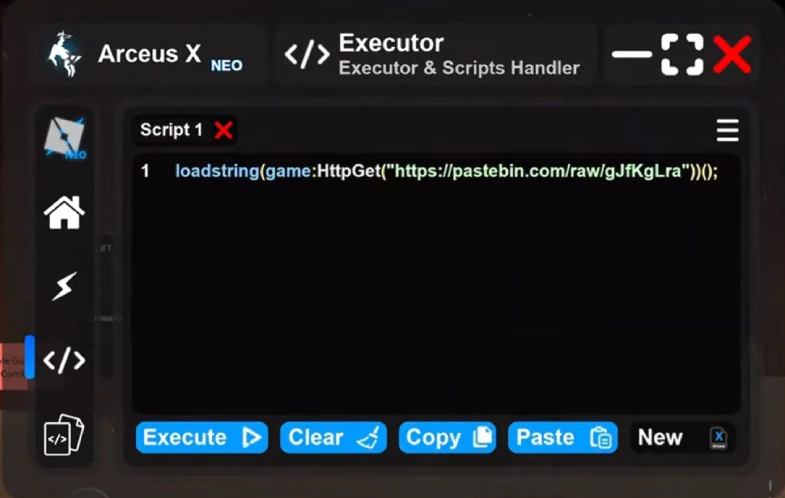

All Roblox game players know that Arceus X is a famous script executor. Players can paste and execute custom scripts in games by using it. But it is widely known that the executor is available for Android devices.
That’s why people often search for the Arceus X iOS availability and how to download and use it. Well, there is good news that Arceus X is available for iPhone and iPad. Once you get the executor, you can access various unlocked features and improve your game progress. When you decide to use Arceus, you should be careful, as Roblox does not allow using such tools.
In this guide, we will explore everything related to using Arceus X on iOS, its compatibility, and safety. So keep reading!
What Is Arceus X?
Arceus X is a third-party script executor that is commonly used in Roblox games. Players who are tired of slow game progress use it to run custom Lua scripts in the game. Moreover, this executor is available in different versions for mobile platforms.
But the most used ones are Arceus X V5 and NEO. This executor also has a built-in script library, so you can choose scripts from there and use them. Some commonly used scripts in Roblox are Blox Fruit scripts for teleport, auto farm, auto quest, and more.
Is Arceus X Available for iOS Devices?
Yes, Arceus X is available for iOS devices such as iPhone or iPad. But you should also know that this availability changes with version and platform. Therefore, you should verify the current release information before installing the app.
However, many online sites claim to offer the iOS version of Arceus, but these are only through the IPA file or a different installation package. Before installing Arceus X for iOS, you should ensure:
- It supports your iOS or iPadOS version
- The source offering the app is secure and safe
- The current version is updated
- The installation method is secure
Key Features of Arceus X for iOS
The Arceus executor contains many useful features that improve the gaming experience of players. However, the features are almost the same for all devices like Android and iOS.
A detail of some specifications is given below:
Script Execution
The main function of Arceus X is script execution. You can easily run any Roblox Lua script with Arceus and enjoy customized features. By using it, you don't need to use any other executor.
Simple Interface
The interface of the executor is simple, so that every player can use it. Moreover, it also provides a simple GUI. This allows players to change features and other functions in the game.
Wide Script Compatibility
With Arceus X iOS, you will enjoy wide script compatibility. This means you can use it for any Roblox script, such as Blox Fruit or Redz Hub. But you must also know that compatibility can vary with Roblox updates.
Regular Updates
When the Roblox iOS version updates, the developers of Arceus X also update it. So that it remains compatible with the Roblox game. See how to update Arceus X on iOS when a compatible release is available.
AI-Assisted Features
The good news is that the Arceus X V5 now supports AI features. It is capable of supporting and easily running AI-assisted scripts in-game.
Customization
Some versions of Arceus X iOS have an amazing option for customization. You can edit, manage, and organize your scripts within the executor.
Details of Arceus Executor Compatibility with iOS Devices
Before you decide to download Arceus X iOS, you should check its compatibility with your device.
Here is a quick overview of Arceus compatibility with iOS devices:
| iOS Device | Operating System | Compatibility | Key Consideration |
|---|---|---|---|
| iPhone | iOS | Version-dependent | Check the supported iOS version before installation |
| iPad | iPadOS | Version-dependent | Compatibility may vary by iPadOS version |
| Older iPhone | Older iOS | May be limited | Newer releases may not support older iOS versions |
| Newer iPhone | Latest iOS | Release-dependent | Check the latest Arceus X requirements |
| Older iPad | Older iPadOS | May be limited | Hardware and OS version can affect compatibility |
| Newer iPad | Latest iPadOS | Release-dependent | Verify support for the current iPadOS version |
How to Download Arceus X on iOS?
Here are quick and easy steps to download Arceus X on your iPhone or iPad.
- 01
First of all, you should check your iOS or iPadOS version from the “About” section of Settings.
- 02
Now, ensure that the latest version of Arceus executor is compatible with iOS.
- 03
Now, search for the official Arceus executor download website and open it.
- 04
Click on the download button to begin downloading the file.
- 05
Now, complete the iOS installation steps provided for the executor.
- 06
After installation, you should open the app and set it to use.
How Can Players Use Arceus X to Run Scripts on iPhone or iPad?
Once you install the compatible version of Arceus X for your iOS device, you can use it to run any of your favorite scripts. Here are complete steps to use Arceus to run scripts:
- 01
You should open Arceus X on your iPhone or iPad.
- 02
Now, open Roblox and search for the game where you want to run the custom script.
- 03
Next, open the Arceus X interface when it becomes available.
- 04
In the script section, you should paste the script.
- 05
Lastly, click on the execute button and check the game to ensure the script is working.
Troubleshooting Common Arceus X iOS Problems
It is common to face issues when you are using Arceus X on your iOS devices. Here are a few common problems and their solutions which you can try.
Arceus X iOS Is Not Working
You should check the device compatibility and ensure you have a stable internet connection if your executor is not working.
Executor Crash While Working
The executor can crash if it is incompatible with the current Roblox client or operating system. Therefore, you must check for an updated release and confirm that your device meets its requirements.
Scripts are Incompatible
If the incompatible script issue appears then you must check if you are using the correct script and if it is in the Lua language.
Conclusion
With Arceus X iOS, iPhone and iPad users can enjoy custom Roblox scripts. However, the compatibility of the executor can vary with the latest versions of both iOS and the game itself. Therefore, prior to downloading it, make sure you have the latest information.
Download Arceus X iOSFAQ
Yes. It is safe to use the Arceus executor on iOS devices, especially when you install it from a safe source.
No. There is no need to jailbreak your iOS device to install or use the executor.
Some famous alternatives to Arceus for iOS devices are Delta executor, Hydrogen, Codex, and Fluxus.
Yes. If you do not update the executor after the Roblox update, you may experience compatibility issues or app crashes.
Yes. As Roblox games do not allow third-party execution tools, there may be chances of a Roblox account being banned. That’s why you should use it carefully.